Set Environment Variables in Win XP
Hi Friends!
I apologize again for not continuing with BSOD chapter. I know, some of you would be feeling that this punk is overflowing with ideas & not completing the earlier ones. But, as an adage goes, 'Don't blame the person, blame the situation.' Well I guess, it all fits in here well.
In my quest to help people, when I encounter some one stuck up with something, I feel( and I hope you'l agree) that his priority increase manifold!
So in this post, I am going to talk on how to set up environment privileges in XP machine(same steps follows for Win7).
So let's get started.
Topic: Set environment variable in Win XP.
Let us first understand what Environment variables mean:
Many Operating Systems use environment variables to pass configuration information to applications. They are used as key/value pair where both the key and the value are strings.
Step 1: Right click My Computer -> Properties
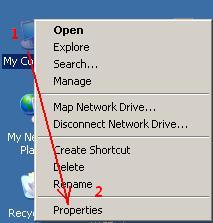
Step 2: Click on Advanced tab. There you will find Environment Variables button at the bottom of the page.

Step 3: You will see a screen as the one below.

Now to create a new environment variable, click on New(enclosed in rectangle)
Step 4: Now give the key/ value pair you like to make as environment variables.

The Path environment variable
The path variable to a file basically represents its location on the file system. It tell the OS, where to find that file. Typically, a group of directories which are repeatedly used, are found. To see, what the path variables contains, go to cmd -> 'echo %PATH%' (don't worry about the case, they are not case-sensitive).

As you can see, there are multiple values, each separated by ';'.
In the same way, you can double click on the variable on the variable in step 3.
So, I guess my java friends won't find issues in this section of the program.
Happy Coding!! ^o
I apologize again for not continuing with BSOD chapter. I know, some of you would be feeling that this punk is overflowing with ideas & not completing the earlier ones. But, as an adage goes, 'Don't blame the person, blame the situation.' Well I guess, it all fits in here well.
In my quest to help people, when I encounter some one stuck up with something, I feel( and I hope you'l agree) that his priority increase manifold!
So in this post, I am going to talk on how to set up environment privileges in XP machine(same steps follows for Win7).
So let's get started.
Topic: Set environment variable in Win XP.
Let us first understand what Environment variables mean:
Many Operating Systems use environment variables to pass configuration information to applications. They are used as key/value pair where both the key and the value are strings.
Step 1: Right click My Computer -> Properties
Step 2: Click on Advanced tab. There you will find Environment Variables button at the bottom of the page.

Step 3: You will see a screen as the one below.

Now to create a new environment variable, click on New(enclosed in rectangle)
Step 4: Now give the key/ value pair you like to make as environment variables.

The Path environment variable
The path variable to a file basically represents its location on the file system. It tell the OS, where to find that file. Typically, a group of directories which are repeatedly used, are found. To see, what the path variables contains, go to cmd -> 'echo %PATH%' (don't worry about the case, they are not case-sensitive).

As you can see, there are multiple values, each separated by ';'.
In the same way, you can double click on the variable on the variable in step 3.
So, I guess my java friends won't find issues in this section of the program.
Happy Coding!! ^o

